
Roofing takeoff software that measures plans digitally and calculates materials automatically.
Upload plans and measure roof areas, lengths and pitch digitally. AI Scan Assist detects roof geometry automatically. Smart Components™ turn measurements into material quantities and priced estimates. Plans from free to $59/month.
No credit card required.
Want to try the measurement workflow first? Try the free roof takeoff tool - upload your own plan, no signup.
What is roofing takeoff software?
Roofing takeoff software helps contractors measure roof areas, lengths and pitch from plans or images, and calculate material quantities from those measurements.
Manual takeoff means printing plans, using a scaling ruler to measure dimensions, counting features by hand, and entering everything into a spreadsheet. It works, but it is slow, error-prone, and has to be repeated from scratch on every job.
QuoteCore+ replaces that with digital takeoff tools and AI Scan Assist. Upload a plan, measure digitally or let AI detect roof geometry, and Smart Components™ automatically apply materials, labour, waste and pricing. The takeoff becomes an estimate, and the estimate becomes a quote — all in one connected workflow.
You may see this category called roof takeoff, roof measurement, roofing quantity takeoff or plan measurement software - and in the estimating stage, roofing estimating from plans. The distinction matters: takeoff creates the measurements; estimating applies the pricing and material logic. This page covers the measurement side; for pricing see roofing estimating software, or turn measurements you already have into pricing.
Whatever your plans and units - PDF drawings or blueprints, shingles, metal panels or membrane, square feet and roofing squares with pitch ratios like 6:12, or square metres with pitch degrees - the takeoff workflow is the same: calibrate, measure, verify, done. Measuring across other trades too? See construction takeoff software for roofs, siding and floors.
 Interactive demo
Try our real system in 30 seconds or less
Scan this sample roof plan with AI or measure it yourself - the same takeoff workstation that's in the app. No sign-in needed.
Key takeoff features
The tools that make takeoff faster and more accurate in QuoteCore+.
Digital roof takeoff
Measure roof areas, lengths and pitch from uploaded plans. Handles angles, complex geometry and multiple roof sections.
AI Scan Assist
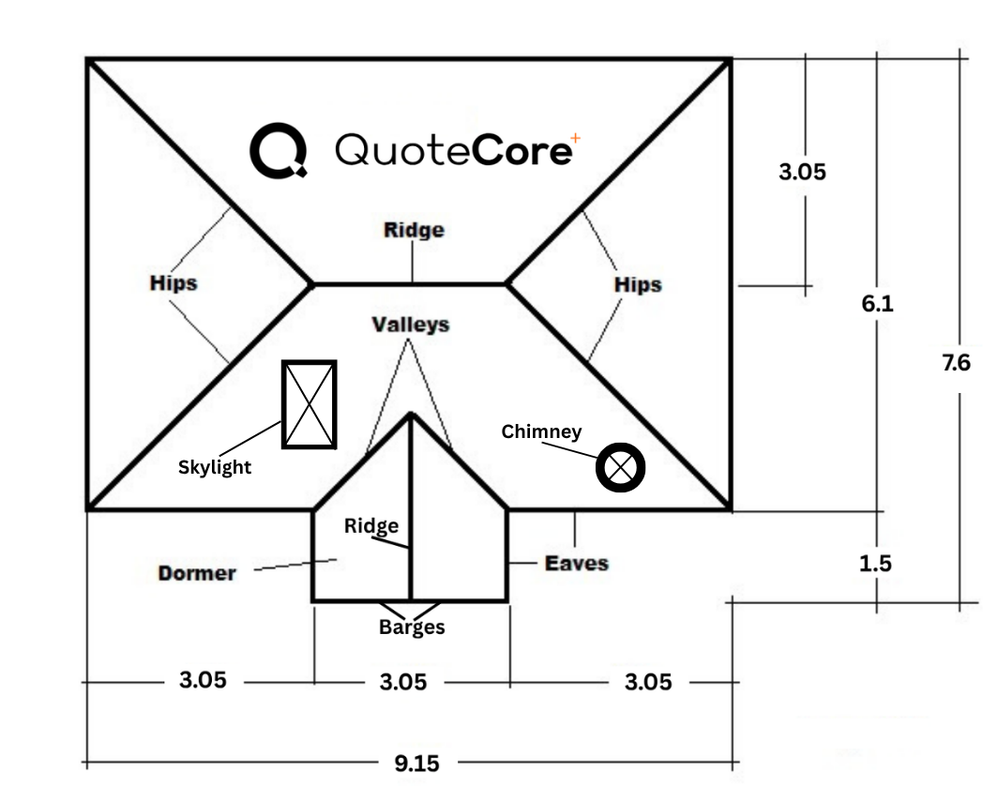
Automatically identifies roof areas, ridges, hips, valleys, barges and spouting from an uploaded plan.
Smart Components™
Automatically apply materials, labour, waste and pricing to takeoff measurements. No manual quantity calculation.
Material ordering
Turn takeoff quantities into a material order with supplier details carried over. No re-keying.
How takeoff works in QuoteCore+
From plan upload to material quantities in four steps.
Upload PDF plans or use AI Scan Assist
Upload a roof plan, satellite image or drawing. Use AI Scan Assist to auto-detect roof areas, ridges, hips, valleys, barges and spouting, or measure manually with digital takeoff tools.
Measure roof areas, lengths and pitch digitally
Name each roof area, assign pitch and material type. Digital takeoff handles angles, pitches and complex roof geometry. Measure ridges, hips, valleys, eaves, barges, flashings and spouting lengths.
Smart Components apply material quantities, waste and labour
Measurements feed directly into Smart Components, which apply your stored materials, waste allowances, labour rates and pricing rules automatically. No spreadsheet formulas, no manual re-entry.
Review, adjust and send as a quote
Check the takeoff and pricing, adjust any measurement or quantity, then send it to the customer as a professional quote. The same data carries through to material orders and invoices.
Keep Xero for accounting
Connect your QuoteCore+ account to Xero, then open a quote summary and choose Send to App → Xero to export its information as a draft invoice with line items. See how the Xero integration works.
What QuoteCore+ measures in takeoff
Roofing-specific measurement types handled by the digital takeoff workflow.
- ✓Roof surface areas (by pitch)
- ✓Ridge, hip, valley, eave and barge lengths
- ✓Flashing and trim lengths
- ✓Spouting and downpipe quantities
- ✓Pitch and slope calculations
- ✓Material quantities with waste allowances applied
Takeoff vs estimating — what's the difference?
Takeoff is the measurement step — measuring roof areas, lengths and pitch from a plan. Estimating adds pricing, labour, waste and material quantities to those measurements.
Many contractors do takeoff in one tool, then re-enter the measurements into a spreadsheet to estimate. QuoteCore+ does both in one workflow: takeoff measurements feed directly into Smart Components™, which apply materials, labour, waste and pricing automatically.
See the roofing estimating software page for more on the estimating side.
What QuoteCore+ does not do
No 3D modelling
QuoteCore+ measures roof geometry in 2D from plans and images. It does not generate 3D roof models or visualisations.
No cutting lists
QuoteCore+ calculates material quantities and pricing, not individual cutting schedules for each piece of material on site.
Comparing takeoff tools?
Looking at RoofSnap, EagleView, PlanSwift, Roofr, STACK, HOVER or Bluebeam? We compare them with QuoteCore+ honestly — features, workflow and pricing:
RoofSnap alternative
Closest product-to-product comparison — measure-and-quote software vs software.
EagleView alternative
Aerial measurement reports vs plan-based takeoff you own.
PlanSwift alternative
General-purpose desktop takeoff vs roofing-native quoting.
Roofr alternative
Broad roofing CRM platform vs focused estimating workflow.
STACK alternative for roofing
Multi-trade preconstruction platform vs roofing-native estimating.
HOVER alternative
Generated 3D property measurement vs owning the takeoff.
Bluebeam alternative for roofing
PDF toolkit you configure vs roofing workflow already modelled.
Common questions
Can QuoteCore+ do roofing takeoffs from PDF plans?
Yes. Upload a PDF plan, satellite image or drawing and use the digital takeoff tools to measure roof areas, ridge, hip, valley, eave and barge lengths, and pitch. Measurements are calculated automatically and feed directly into Smart Components for pricing.
How does AI Scan Assist work for roof takeoffs?
AI Scan Assist analyses an uploaded plan and automatically identifies roof areas, ridges, hips, valleys, barges and spouting. You review and adjust the detected measurements before they become part of the estimate. It significantly speeds up the takeoff process, especially for complex roofs with multiple sections.
Can I measure ridge, hip, and valley lengths, not just roof areas?
Yes. The digital takeoff tools measure both roof surface areas and linear lengths — ridges, hips, valleys, barges, eaves, flashings and spouting. All measurements can be named, grouped by roof section, and assigned different materials and pitch values.
Does QuoteCore+ calculate material quantities from takeoff measurements?
Yes. Smart Components apply your stored materials, labour, waste allowances and pricing rules to takeoff measurements automatically. When you measure a roof area, the corresponding material quantities, screws, flashings and labour are calculated without manual entry.
What plan formats does QuoteCore+ support for takeoff?
QuoteCore+ supports uploaded images (PNG, JPG) and multi-page PDF plans - upload the whole PDF (e.g. council plans), pick the page you need, and it is converted to an image for measuring. For best results, use a view that shows just the area you want to measure, large enough to read clearly, with the scale or a known dimension visible so you can calibrate. You can also use the free roof takeoff builder without uploading a plan if you already have measurements.
Can I export takeoff measurements without creating a quote?
Yes. Measurements can be reviewed and adjusted before you decide to create a quote. The takeoff feeds into the estimate and quote only when you choose to proceed. The free roof takeoff builder also lets you generate measurements without any commitment.
Related
Roofing estimating software
Turn takeoff measurements into priced estimates with Smart Components.
Roofing quoting software
The full quote-to-invoice workflow for roofing contractors.
Digital roof takeoff
Measure roof plans digitally with AI-assisted scanning.
AI Scan Assist
Automatic identification of roof areas, ridges, hips and valleys.
Smart Components™
Reusable components that auto-apply materials and pricing to takeoff.
Free takeoff builder
Try the roof takeoff builder free, no signup required.
Free takeoff calculator
Quick roof takeoff calculations, free to use.
How to do a roof takeoff
Step-by-step guide to measuring a roof from plans.
How to measure a roof
Methods and tools for accurate roof measurement.
Manual vs digital roof takeoff
Weighing tape-and-ladder against measuring from plans on screen.
Measure. Price. Quote.
Stop doing takeoff in one tool and re-entering measurements into another. QuoteCore+ gives you one workflow from plan upload to final payment.
Start your free 14-day trialNo card required. 14 days free. See pricing.