
Roofing quoting software that keeps the whole job connected.
Measure the roof with digital takeoff and AI Scan Assist, build the quote with Smart Components™, send it to the customer, order materials, manage the job, invoice and get paid - all in one connected workflow.
Quick answer
QuoteCore+ is roofing quoting software that does more than format a quote. It helps you move from roof measurements and pricing to customer approval, materials ordering, job management, invoicing and payment without rebuilding the same job information across spreadsheets, emails and documents.
Built from roofing experience, but no longer limited to quoting only. QuoteCore+ supports the wider workflow from quote to payment.
No credit card required.
Most roofing businesses do not lose time because they cannot measure a roof.
They lose time because the same job information gets rebuilt again and again. Measurements go into notes, then a spreadsheet, then a quote, then a materials order, then a job folder, then an invoice.
Every handover creates more admin. Every copy-and-paste creates another chance for something to be missed.
QuoteCore+ keeps the roofing job connected from first measurement to final invoice.
 Interactive demo
Try our real system in 30 seconds or less
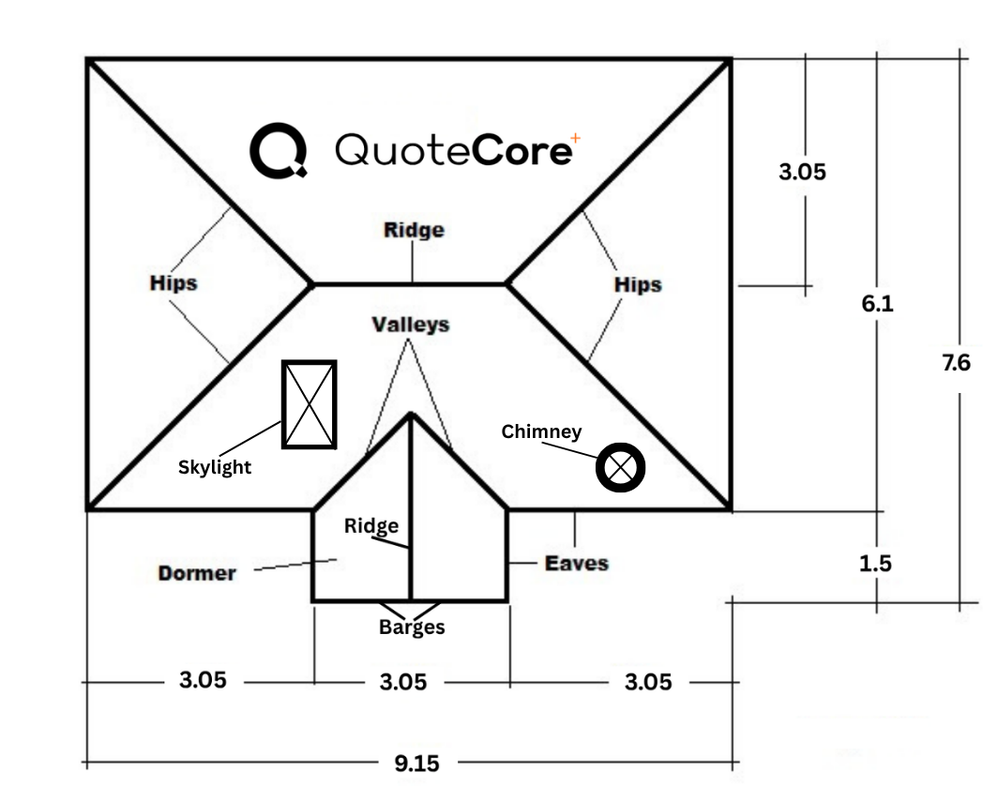
Scan this sample roof plan with AI or measure it yourself - the same takeoff workstation that's in the app. No sign-in needed.
One clean workflow. Measure to paid.
QuoteCore+ helps roofers handle the full job journey: measure, quote, send, track approval, order materials, manage the work, invoice the client and get paid.
Measure the job
Upload a roof plan and use AI Scan Assist to identify multiple roof areas, ridges, hips, valleys, barges and spouting automatically. Name each roof area, assign different pitches and materials, then verify and adjust everything manually. Digital takeoff tools handle angles, pitches and complex roof geometry - then feed straight into your quote via Smart Components™.
Build the quote
Turn measurements into a professional, priced quote using your saved materials, labour, waste allowances, pricing rules and quote templates.
Send and track
Send the quote to the customer with attachments. Track when they open and read it. Set up automatic follow-up emails with configurable delays - and they cancel themselves when the quote is accepted or declined.
Order materials
From the saved quote, create a material order with quantities and supplier details carried over. Choose from three display formats, edit as needed, and send it to your supplier.
Manage the job
Once the quote is accepted, keep the job details, customer information, notes and next steps organised in one place.
Invoice and get paid
Create an invoice from the same saved quote. Configure payment methods - bank details, Stripe links or PayPal links. Recipients can mark the invoice paid or dispute it. The quote, order and invoice all stay connected.
Smart Components™
Smart Components™ for roofing quotes
Roofing quotes repeat more than people think. Roof sections, flashings, waste, pitch, labour, materials, drawings, measurements and pricing rules all come back again and again.
Smart Components™ let you save the way you build and price those parts of a job, then reuse them in future quotes without starting from scratch.
Use Smart Components™ for:
- ✓Roof sections
- ✓Flashings
- ✓Labour rules
- ✓Waste allowances
- ✓Pitch and angle calculations
- ✓Area and length calculations
- ✓Drawings and images
- ✓Materials and pricing logic
Make the component once. Reuse it in quotes, materials and job workflows whenever the same type of work comes up again.
Watch Smart Components™ in action
This tutorial shows how QuoteCore+ lets you save roofing materials, labour, waste, pitch, measurements and pricing logic so you do not have to rebuild the same quote setup every time.
Built from roofing. Designed for the full job workflow.
QuoteCore+ started with roofing because roofing makes quoting complicated fast. Measurements, pitch, waste, flashings, materials, labour, customer approvals and job details all need to line up.
Generic quoting tools often stop at the quote. QuoteCore+ is built for what happens before and after it too - from measurement and pricing through to materials, job management, invoicing and payment.
- Digital takeoffs and measurement workflows built around roofing
- AI Scan Assist identifies roof areas, ridges, hips, valleys, barges and spouting
- Smart Components™ with materials, labour, waste, measurements, drawings, calculations and pricing rules
- Professional quotes that are clear for customers and easy to approve
- Materials ordering connected to accepted quotes
- Job details, invoices and payment workflow kept in one place
- Built for roofing first, flexible enough for wider construction work
For contractors who want quoting to connect to the rest of the job.
Solo roofers
You quote the work, organise the materials, manage the customer and handle the invoice yourself. QuoteCore+ keeps that workflow together so you are not rebuilding the same job at every step.
Roofing teams
Keep quotes consistent, approvals visible, materials organised and job information easier to manage across the team. Everyone works from the same connected job record.
See the full quote workflow in practice.
This walkthrough shows how QuoteCore+ helps create a roofing quote from start to finish, while keeping job information connected for the next steps.
What QuoteCore+ does not do
No CRM or lead generation
QuoteCore+ handles the quoting-to-invoice workflow. It does not manage sales pipelines, marketing campaigns, or customer acquisition.
No accounting or tax returns
Invoices are created and tracked, but QuoteCore+ does not handle VAT/GST returns, profit and loss, or balance sheets. Use accounting software for that.
No payment processing
Invoices include payment instructions, but QuoteCore+ does not process card or bank payments. Customers pay via bank transfer using the details on the invoice.
When QuoteCore+ may not be the right fit
You only need basic quote templates
If you create a few quotes a month from a simple Excel template and that works for you, QuoteCore+ may be more than you need. It adds the most value when you quote frequently and want a connected workflow from measurement to invoice.
You need full project management
QuoteCore+ handles quoting, material ordering, and invoicing, not construction project management. If you need scheduling, Gantt charts, or resource allocation, use dedicated project management software.
Built for contractors who quote from measurements.
Whether you quote roofing, cladding, fencing, or wider construction work, the workflow is the same: measure the job, price it, send the quote, order materials, and invoice when it is done. QuoteCore+ keeps all of that in one place.
Stop rebuilding the same job
Measurements, materials, labour, waste, and pricing go in once. The quote, material order, and invoice all pull from the same saved data.
Quote faster with Smart Components™
Save your roofing sections, flashings, labour rules, waste allowances, and pricing logic once. Reuse them on every future quote without starting from scratch.
Track quotes and follow up automatically
See when customers open your quote. Set up automatic follow-up emails that cancel themselves when the quote is accepted or declined.
From quote to invoice in one workflow
Create a material order from the saved quote. Create an invoice from the same data. Configure payment methods per invoice. The job stays connected from start to finish.
Common questions
What is roofing quoting software?
Roofing quoting software helps contractors turn measurements, materials, labour and pricing into professional quotes. QuoteCore+ goes further by keeping the workflow connected after the quote is sent, including approval tracking, materials ordering, job management, invoicing and payment.
How is QuoteCore+ different from generic quoting tools?
Most generic quoting tools help you create a quote document. QuoteCore+ is built around the full workflow roofing contractors deal with: measuring, pricing, quoting, customer approval, ordering materials, managing the job, invoicing and getting paid.
Can QuoteCore+ help with roofing measurements?
Yes. QuoteCore+ combines digital takeoff tools with AI Scan Assist to identify roof areas, ridges, hips, valleys, and barges from an uploaded plan. Measurements feed directly into Smart Components™, which apply your stored pricing, labour, waste, and business rules - so the takeoff becomes a priced quote without manual re-entry.
Does QuoteCore+ handle materials ordering?
Yes. From a saved quote, you can create a material order with quantities and supplier details carried over. Choose from three display formats (line-by-line, single-column with images/drawings, or double-column), edit as needed, and send it to your supplier.
Does QuoteCore+ include invoicing?
Yes. Create an invoice from the same saved quote. Configure payment methods per invoice - bank details, Stripe links or PayPal links. Recipients can mark the invoice paid or dispute it. QuoteCore+ presents the payment options but does not process payments directly.
Is QuoteCore+ only for roofers?
QuoteCore+ is built for roofing first - the hardest trade to measure and quote. That same engine also handles construction and other measured trades.
Is there a free trial?
Yes. QuoteCore+ offers a 14-day free trial with no credit card required.
What is the best roofing quoting software?
The best roofing quoting software depends on your workflow. If you quote from plans and measurements, need digital takeoff, want AI-assisted plan reading, and want to connect quoting to material ordering and invoicing, QuoteCore+ is built for that workflow. See our comparison of UK roofing quoting software for a detailed breakdown.
Does QuoteCore+ support metal roofing?
Yes. Smart Components can store metal roofing materials, pricing, waste allowances, screw counts, and custom lengths. The free metal roofing calculator gives quick material estimates without signing up.
Greg Kepp
Sky High Roofing
“We haven’t had to print out a roof plan since we started using QuoteCore+. I was sceptical at first, but once you get used to measuring everything on screen it’s hard to imagine going back, not to mention its at least 4x faster than our old process. We’re still only using a fraction of what the app offers but very happy so far”
Related
RoofSnap alternative
How the two roofing quoting workflows compare.
Roofing estimating software
Measure roofs, calculate materials and labour, and build accurate estimates.
Roofing takeoff software
Measure roof plans digitally and calculate material quantities.
Digital roof takeoff
Measure roof plans digitally with AI-assisted scanning.
Smart Components
Reusable components that store pricing, product codes, and quantities.
Invoicing
Create professional invoices from accepted quotes with payment details attached.
Free roofing calculator
Pitch, rafter lengths, areas, and material quantities.
Free metal roofing calculator
Estimate metal roofing materials and costs.
Free roof pitch calculator
Calculate pitch from rise and run or convert degrees.
Free quote generator
Create a professional quote for free, no signup required.
Customer stories
Real contractors using QuoteCore+ in their workflow.
Quote. Manage. Grow.
Stop running one roofing job through five different tools. QuoteCore+ gives you one connected workflow from first measurement to final payment.
Start your free 14-day trialNo card required. 14 days free. See pricing.